Small is beautiful? Using small language models as a stepping stone towards implementing the code of conduct democratic AI at CorrelAid

Last year, we signed the code of conduct democratic AI (CoC). A couple of discussion rounds dissecting the eight principles led us to a working hypothesis: small language models might mitigate some of the challenges of large-scale models. Thus, our process led us to a three-part tech & talk workshop series in which we learned how to run small language models locally and discussed how this will help us implement democratic AI. Thanks to everyone involved! We look forward to continuing the dialogue because given the rapid change in the AI sphere the implementation of the CoC in our community will remain an ongoing process.
Just like the workshop series this blog post provides a tech & talk mix: a technical how to use small language models locally and a discussion on how this helps us implement the CoC democratic AI.
Working with language models requires: Brain & Skull
In our workshop series, CorrelAid volunteer Chris, who led the technical part, used “skull and brain” as a metaphor for how to make a language model run locally.
Besides the trained model – the brain – you need an inference machine – the skull – that produces the answer. It appears just like a chat window; yet, does much more! It takes the chat message and, given its training, infers an answer. It’s a bit like the prediction stage in traditional machine learning.
The smaller the model in terms of training parameters the less computational power this inference process needs. The definition of “small” extends up to ten billion parameters according to Hugging Face. In our workshop we focussed on models with around three billion parameters since they can run on almost any computer a typical European uses.
How to use small language models with LM Studio
There are many ways of running small language models (SLMs) locally. In our workshop series we checked out Ollama, LM Studio and even built a model from scratch in python following Karpathy’s instructions. Here we outline how to use LM Studio because at least at the time of our workshop it did not require any command inline interaction but instead is easy to install and work with. Do reach out, in case you know of any open source options that are as easy to use.
- Download the inference engine from https://lmstudio.ai/
- Install lm studio
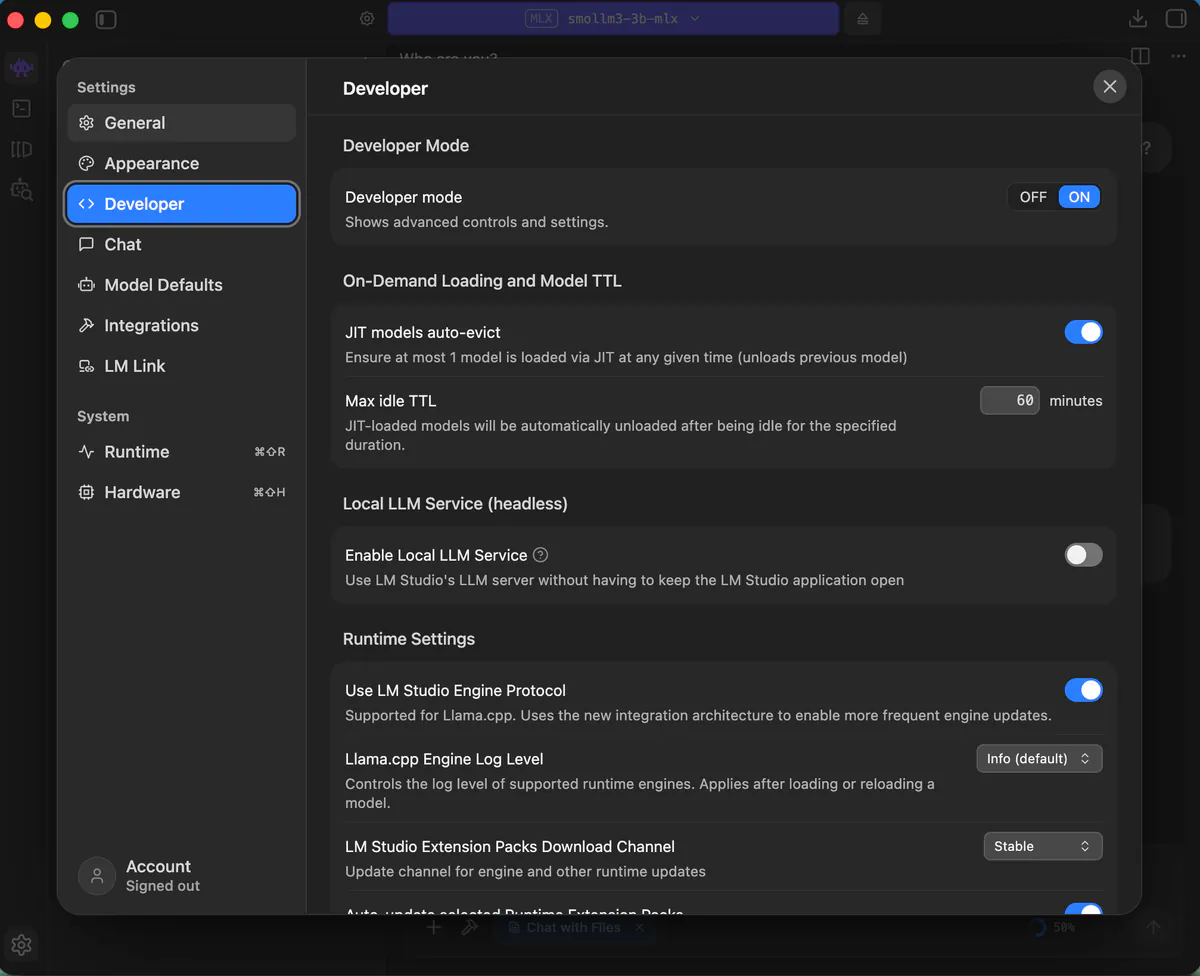
- Enable Developer mode in the settings
Among many other options, enabling developer mode will provide you with stats on the context in the chat.
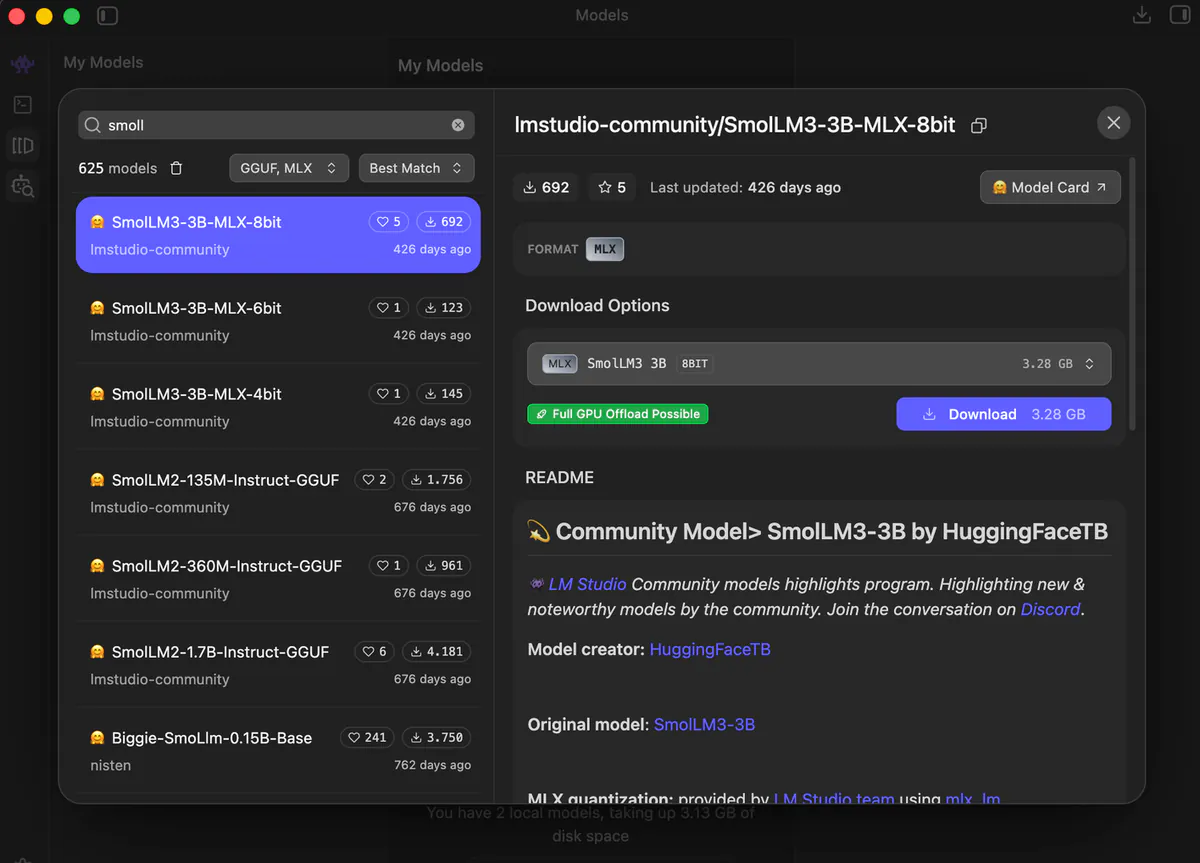
- Search and download a model
The fourth icon in the upper left corner, the little robot with a magnifying glass, links to a hugging face integration. It is kind of like a marketplace for models. There you can search for a model and then click on the purple “download” button to the right. Please note, the MLX format is for macs, the gguf format is more suitable should you be working with a different operating system.
Depending on your bandwidth, downloading will take a few minutes.
What model to choose? In our workshop we worked with SmolLM3-3B-MLX-8bit (an open source model) and ministral-3-3b (a model by a European company). But there are many more options. LM Studio will also inform you if a model is too big to run properly on your specific machine.
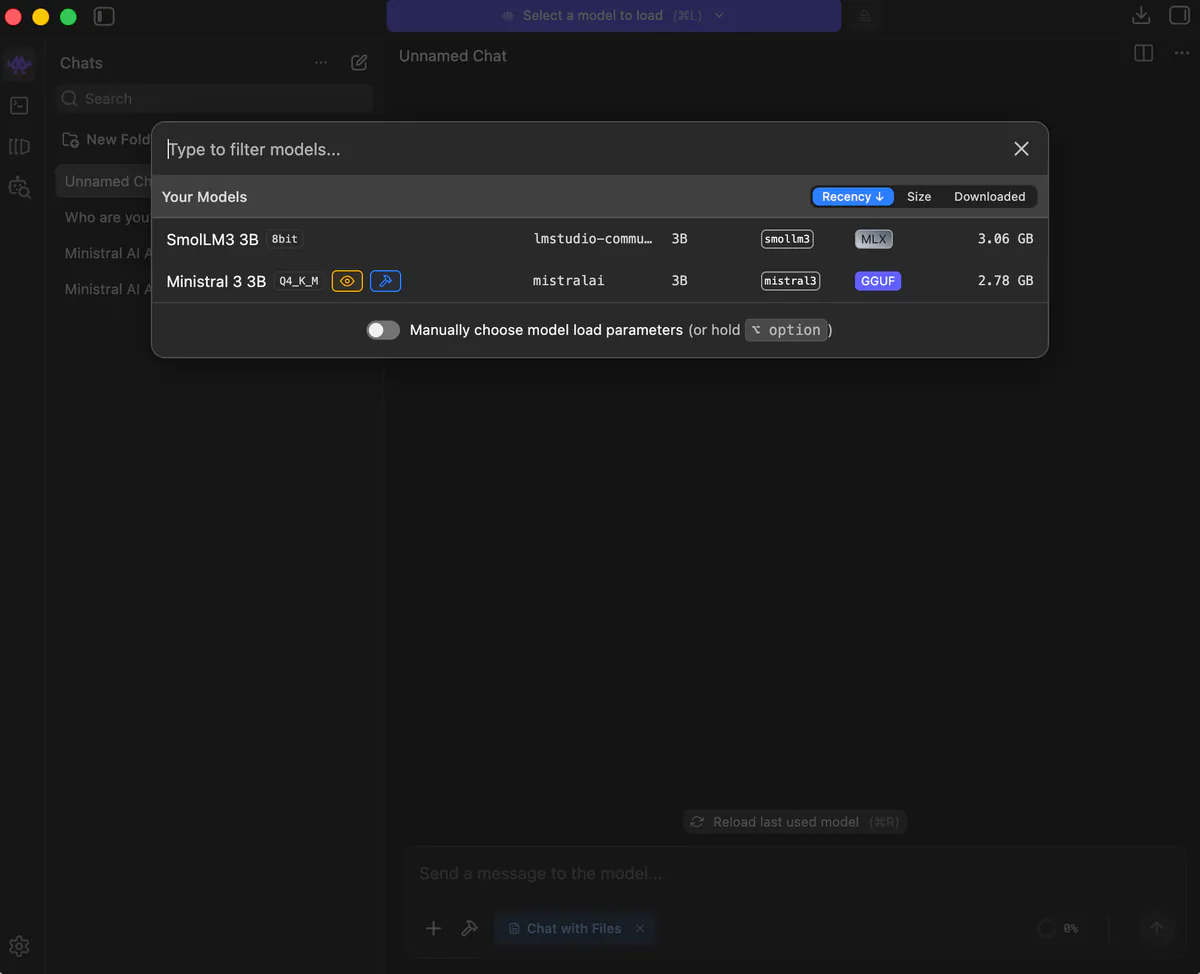
- Load Model, start chatting and always be aware of hallucinations.
To start chatting click on the first icon on the upper left corner. You can then easily load a model: Just click on the purple bar at the top. You will be able to select a model that you have previously downloaded.
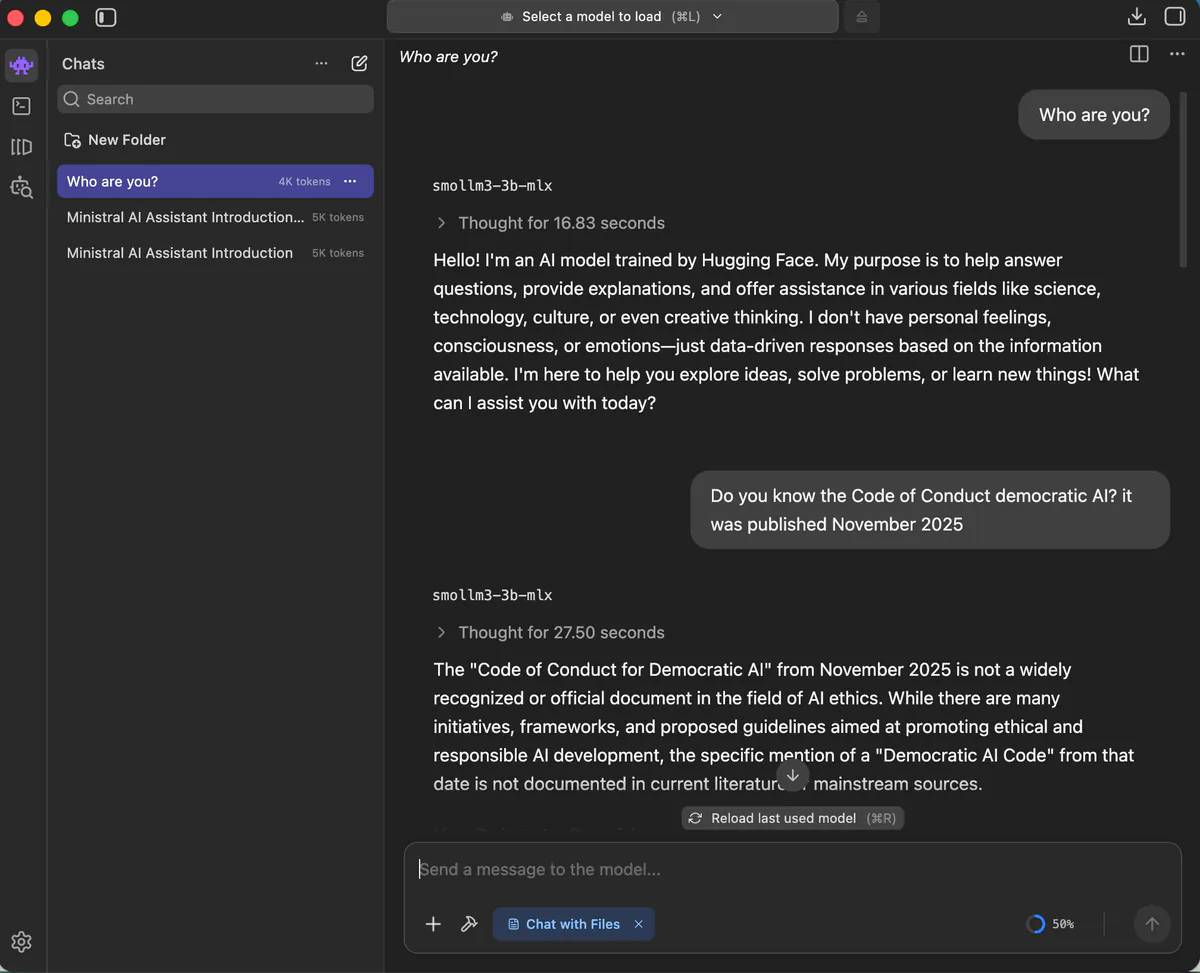
When chatting be mindful of what information was actually available at the time of training data. Asking the model “Who are you?” or “When were you last updated?” will help assess answers. For example, our first question about the CoC democratic AI actually produced quite a bit of hallucination. Not because our context window was full but because the smollm3 model was trained on data up to December 2021 and the code of conduct was published in November 2025.
- Add a document and apply the model to it.
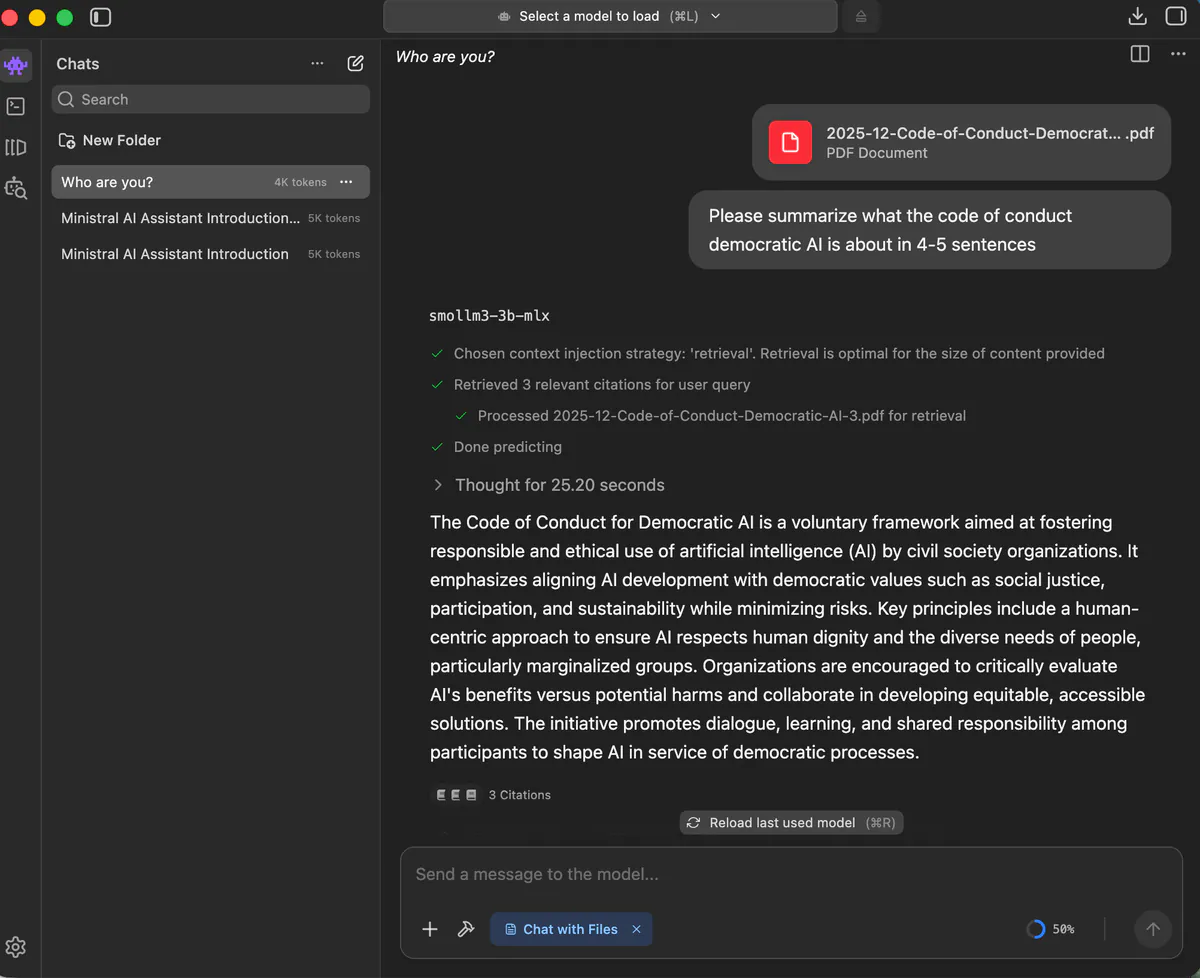
For the model to provide us a meaningful answer on the CoC we can add this document and then chat with this file. This means we apply the inference of the model to new data. This RAG approach is easy to implement with LM Studio, simply click on the plus sign and add your document. In the snapshot below, once we uploaded the CoC democratic AI the summary is no longer a hallucination.
Tech & talk: How does this workshop help with democratizing AI?
The workshop series itself is a way of implementing the CoC since it not only provides concrete technical skills on how to use small language models but includes a thorough discussion part. This raises awareness among all participants on non-technical things involved, something we at CorrelAid consider important in an ever-changing environment as the AI sphere. Through this discussion, we actually did find some answers on how small language models can help with democratizing AI. Surely, there is not a match for all principles of the CoC but there is overlap with many.
“Mindful Use … weighing up the opportunities and risks of using AI for our work and target group“ (CoC)
For our tasks as data analysts or data scientists, we do not need AI, nor a large model. If we do decide on working with a language model, using a SLM as outlined above slows down the process. While choosing the right model for the task at hand there may be a moment of pause. This is a form of mindfulness. For SLMs it makes sense to choose a more specific model - this conscious decision is also a form of mindfulness.
“AI literacy … empowering our employees and activists to use AI systems in a reflective manner through training and systematic competence building” (CoC)
The workshop series led to quite a few “aha”-Moments. Yes, using SLMs locally takes a bit of time setting up, but it is exactly this process that creates a deeper understanding of how language models work. Further, participants were also struck by how many different models there are, and not only by the big players. In short, our volunteers amplified their AI literacy, gained a deeper understanding, and more options to choose from.
“Transparency … in the data foundation, how AI systems work and their results, as well as where they are actually used” (CoC)
First, the local nature of the chat allows to keep inputted data private. Second, since SLMs can run on local devices users maintain greater control over their data and interactions. You can also control more parameters than with big models which always require a chat hosted online. For instance, one could select “temperature”, the degree of randomness of a model’s answer, or “top_p”, which controls the diversity of the answer.
“Participation and inclusion … creating opportunities for our employees to participate in the development, selection, and use of AI systems” (CoC)
Participants left the workshop series feeling less dependent on big tech. We also tried out augmenting the training data by including new documents into the chat. This actually is a form of participating and further developing an AI model.
“Anti-Discrimination … ongoing learning, building awareness of power dynamics, handling mistakes transparently” (CoC)
To be clear, this is a caveat: SLMs may be more biased and tend to hallucinate more. Hence, they actually leave more room for discrimination. Carefully picking a model that specializes in the task at hand, e.g. using a model trained for coding for coding tasks, is a possible way of mitigating this.
“Environmental Sustainability … evaluating AI systems across their entire lifecycle when selecting and using them, giving priority to sustainable alternatives.” (CoC)
Smaller and potentially more specialized models need less energy in training since the algorithm needs to sieve through fewer data points. On the other end of the lifecycle, using SLMs locally, only uses the energy of the local computer, no need for large data centers for the query and thus less energy consumption.
Summing things up…
Using SLMs provides a way to act more mindfully, sustainably, increase one’s AI literacy, and remain the owner of the inputted data. In short, it gives back some agency in the fast-spinning AI sphere. The mix of tech & talk in the workshop series has been crucial to our process of implementing the CoC. That is why tech & talk is what we as the CorrelAid community will continue to also live up to the CoC’s principles “Responsibility and Accountability” and “Human Centric Approach”.